
Most businesses obsess over backlinks. They spend so much time and money getting other websites to point to theirs. That is smart. But there's a second type of link that gets ignored, costs nothing, and can move your search rankings just as fast.
Internal links. The links you put inside your own website, pointing from one page to another.
Done right, they do two things at once: they help Google understand which pages on your site matter most, and they guide real visitors toward your best content. These are the pages most likely to turn a browser into a buyer.
Here's how to build an internal linking strategy that actually works.
What Is an Internal Link, Anyway?
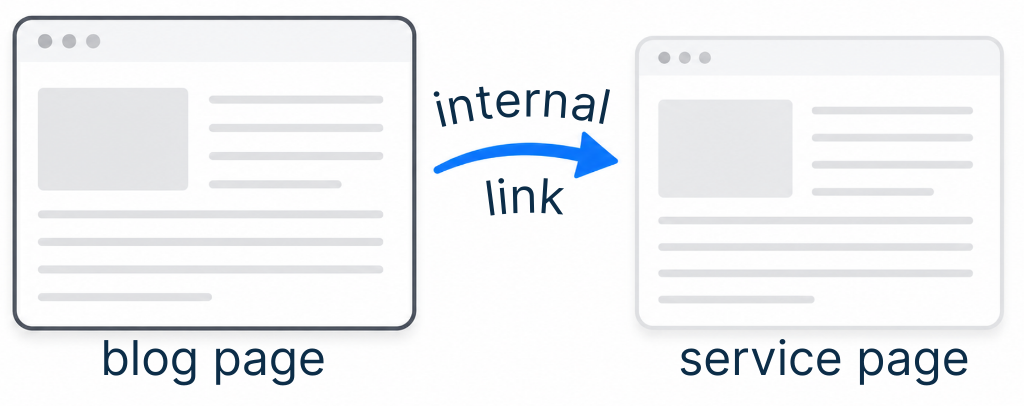
An internal link is any link that goes from one page on your website to another page on your same website.
They show up in a few places:
- Navigation menus (top, footer, sidebar)
- Within your articles and blog posts
- On service or product pages
The underlined or highlighted phrase that contains the link is called anchor text. Anchor text wording really matters and we'll uncover more on that in a moment.
Why Internal Links Are a Bigger Deal Than You Think
Think of your website like a city. Your pages are the buildings. Internal links are the roads between them.
If Google sends a crawler to explore your site and all the roads dead-end, it can't get very far. It doesn't understand what your city is about or which buildings are the most important ones. It moves on.
When you build a smart internal linking structure, you're essentially handing Google a highlighted map and saying: these are the important stops. Google takes the hint. Your key pages climb in the rankings.
For your visitors, good internal links mean they don't get stuck. They follow a natural path from "I'm curious" to "I'm ready to buy," without ever feeling pushed.
The 3 Internal Linking Structures That Work
There isn't one magic method. There are three! And they each serve a different goal. Use the method that fits where your site is right now and layer the three methods together as you grow.
Structure 1: The Basic Linking Structure
Goal: Signal to Google which pages are your most important

Pick two or three pages on your site that you want people to find most. These might be:
- Your main service pages
- A high-converting landing page
- Your most popular blog post
Now treat each of those pages like its own home base. Every time you publish new content that's related to one of those pages, pick the relevant key words and link them to their home base. Every time.
Think of it like casting votes. Each link from a related piece of content tells Google: this page is worth paying attention to. The more votes it gets from relevant pages, the more Google trusts it.
Make the anchor text count. The clickable phrase in your link should describe what's on the destination page. Don't link the word "here." Link a phrase like how to get more Google reviews, something that tells both the reader and Google exactly where they're headed.
Quick test before you link:
- Does the anchor text include a keyword related to the destination page? ✓
- Does the surrounding sentence make sense? ✓
- Does the destination page actually deliver on what the anchor text promises? ✓
If all three are yes, you're linking correctly.
Structure 2: The Keyword-Oriented Linking Structure
Goal: Rank for one specific keyword phrase
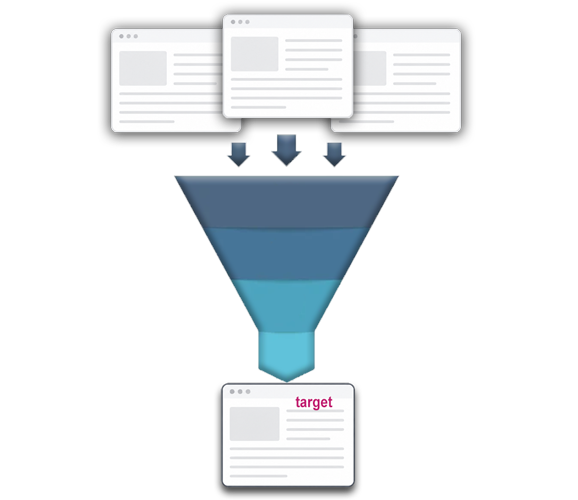
If there's one keyword phrase you're trying to own — like HVAC repair in Albuquerque or nail salon downtown Santa Fe — this structure puts all your weight behind it.
Here's how it works:
- Choose your target page. This is the page you want to rank for that keyword — a service page, a product listing, or a detailed guide.
- Link to it from every piece of content you publish that's even loosely related.
- Vary your anchor text. Don't use the exact same phrase every time. Google reads that as spammy. Mix it up. "HVAC repair near you," "local heating and cooling service," "fix your AC before summer," all pointing to the same page.
- Go back and update old posts. This is something most people skip. Neil Patel, one of the most cited SEO experts in the industry, says updating old content with new internal links can accelerate your rankings by months.
You won't see overnight results. Patel estimates 5–6 months to see meaningful movement — which is normal for any SEO strategy. But with every new piece of content, you're adding another vote. The signal compounds.
Structure 3: The Topic Cluster Linking Structure
Goal: Establish authority on an entire subject — not just one page
This is the most powerful of the three structures, and the one that takes the most planning. But it pays off. HubSpot, Brightedge, and other major marketing authorities have all called topic clusters the future of SEO, not because it's a trend, but because it mirrors exactly how Google wants to see a site organized.
Here's the concept in plain terms:
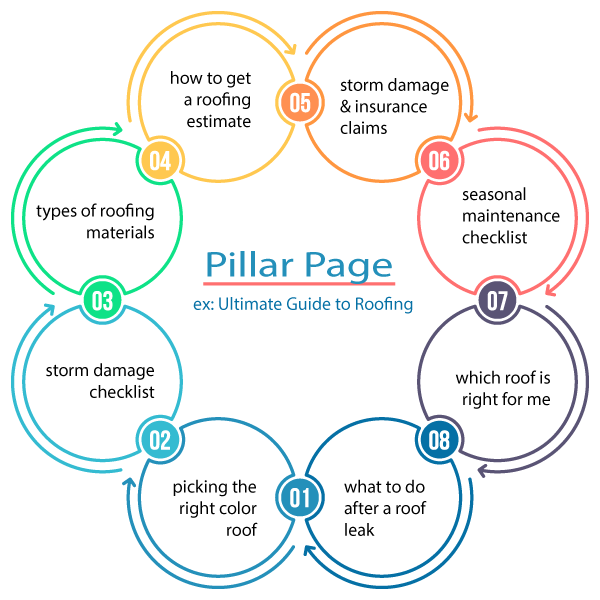
You write one big, comprehensive "pillar" piece on a broad topic. Then you write a cluster of smaller, more specific articles that all relate to that topic, and then you link them all together.
Example:
- Pillar page: The Complete Guide to Commercial Roofing in New Mexico
- Cluster pages: How to Spot Storm Damage, Flat Roof vs. Pitched Roof: Which is Right for Your Building?, What to Expect from a Commercial Roof Inspection
Every cluster page links back to the pillar. The pillar links out to each cluster page. Google crawls the whole web of content, sees that your site covers this topic from every angle, and decides you're the authority. Rankings follow.
Two types of pillar pages to choose from:
| Type | What it is | Best for |
|---|---|---|
| Resource pillar | Links out to other helpful sources (even competitors) | Building trust and comprehensiveness |
| 10X content pillar | Built entirely from your own internal links | Keeping visitors on your site longer |
The term "10X content" comes from SEO pioneer Rand Fishkin, who set a simple standard: your pillar page should be ten times more useful than anything else ranking for that topic. That's a high bar, but it's also exactly the bar Google rewards.
Format your pillar page like a guide:
- Open with a table of contents (linked to each section)
- Add a "back to top" link at the end of every section
- Consider offering a downloadable PDF version. HubSpot found that 90% of readers prefer PDF for long-form content, and many will trade their email address for one
How to Remember Which Structure to Use
Here's the simplest version of all three:
| Structure | Use it when... | Primary benefit |
|---|---|---|
| Basic | You have key pages you want Google to notice | Improves rankings on your most important pages |
| Keyword-oriented | You want to rank for one specific phrase | Concentrates SEO power on a single target |
| Topic cluster | You want to own an entire subject area | Builds long-term authority and organic traffic |
You don't have to pick just one. Most established sites use all three at the same time. They just start with the basic structure and layer in the others as they grow.
The One Thing to Do This Week
Go into your last five blog posts or website pages. In each one, find a natural place to add a link to one of your most important pages — your main service page, your contact page, whatever page you most want visitors to land on.
That's it. Five links. Probably 20 minutes of work. And you've just started casting votes for the pages that matter most to your business.
The sites that rank well aren't necessarily the ones with the best content. They're the ones that made it easiest for Google (and for real people) to find their best content.
Build the roads. The traffic follows.
Want help building a website that's already structured for search? Spark Advisory builds fast, professional sites for local businesses — live in 24 hours, $499 flat.

0 Comments