
You could build the best nail salon in Albuquerque: the cleanest shop, the most talented staff, five-star reviews from 200 happy customers. And if your website is invisible to Google, none of it matters to the person searching for a salon right now.
That's the problem SEO solves.
SEO stands for Search Engine Optimization. It's the practice of making your website easier for Google to find, understand, and recommend. Not through tricks or shortcuts, but through structure, content, and credibility signals that Google's algorithm rewards
Here's what you need to know to actually move the needle.
The Way Google Decides Who Ranks
Google changes its ranking algorithm 500 to 600 times a year. Most of those updates are small tweaks, while a few major updates can reshape rankings overnight.
What stays constant is the goal: Google wants to show the most useful, trustworthy result for every search. Your job is to make your website look exactly like that.
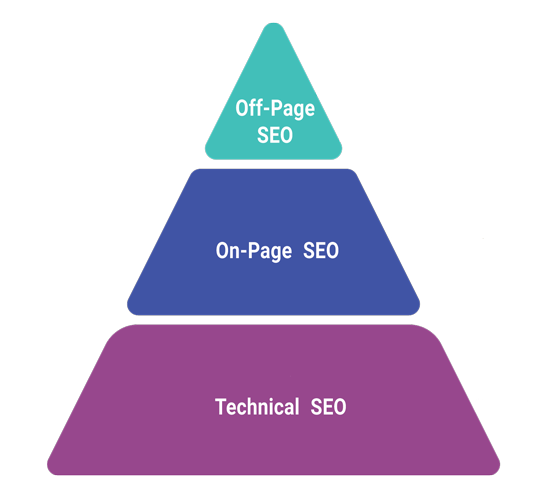
There are three categories of work that accomplish this: Technical SEO, On-Page SEO, and Off-Page SEO. Most guides bury you in all three at once. This one works through them in order, because that's how they build on each other.
Part 1: Technical SEO: Build the Foundation First
Think of technical SEO like a building inspection. Before you hang the art and arrange the furniture, you need to know the structure is sound. Technical SEO is that inspection. It covers everything that makes your site work properly for both Google and your visitors.
Get this wrong and the rest of your work becomes harder than necessary. Get it right and everything else you do compounds faster.
Structure your site so Google can find everything
Navigation should work in as few clicks as possible. Every important page on your site should be reachable within two or three clicks from the homepage. Google's crawlers follow links. The deeper a page is buried, the less attention it gets.
Test your navigation with fresh eyes. Better yet, have someone unfamiliar with your site try to find something specific and watch what they do. If they hesitate, Google hesitates too.
Create and submit an XML sitemap
A sitemap is a file that lists every page on your website. Submitting it to Google Search Console is like handing Google a floor plan of your building instead of making it explore room by room. It speeds up indexing and ensures no pages get missed.
Most website platforms like WordPress, Wix, or Squarespace can generate one automatically. Once it's created, submit it in Google Search Console. It takes about two minutes.
Fix your site speed
Speed is a ranking factor and a trust signal. A site that loads slowly signals to visitors and Google that something is off.
Here's the math that matters: the average human attention span before abandoning a webpage is around 8 seconds. Your site should load in under 3. Every additional second of load time increases your bounce rate (the percentage of people who leave without doing anything). A high bounce rate signals to Google that your page wasn't useful, causing rankings to drop.
Quick wins for faster load times:
- Compress your images before uploading them
- Reduce the number of plugins if you're using WordPress
- Use a caching plugin to serve pages faster to repeat visitors
- Ask your hosting provider if your plan is appropriate for your traffic
Part 2: On-Page SEO: Make Every Page Worth Finding
Once your technical foundation is solid, on-page SEO is about making the content of each page as clear and useful as possible, for humans first and Google second.
This is where most of the work happens. And most of the opportunity.
Write content people actually want to read
This sounds obvious, but it isn't. A lot of business websites are written to check boxes instead of answering questions. "We are a full-service HVAC company serving the greater Albuquerque area with over 20 years of experience" tells a visitor almost nothing meaningful.
A visitor searching for help with a broken furnace in January wants to know: Can you help me? How fast? What will it cost? Will you show up when you say you will?
Write to answer those questions. Use the language your customers actually use to describe the problem, instead of the language for your services. Google's algorithm is increasingly good at recognizing whether content genuinely answers someone's search.
The result: more time on page, lower bounce rates, and higher rankings. Not because you gamed anything, but because your content did its job.
Use keywords the right way
Keywords tell Google what your page is about. The goal isn't to stuff them everywhere, but to use them naturally in the places Google checks first.
Those places are:
- Your page title
- Your H1 (the main headline on the page)
- Your URL
- Your meta description (the preview text in search results)
- Throughout the body text, wherever they fit naturally
Do keyword research before you write. Free tools like Google's Keyword Planner or Ubersuggest can show you phrases real people are searching for in your area. Build your page around those phrases.
Write headlines that earn the click
Your page title is the most important piece of text on the page. It's what shows up in Google search results. It's what people decide within half a second whether to click on or skip.
A bad title describes your page. A good title earns attention.
Weak: "HVAC Services in Albuquerque" Stronger: "HVAC Repair in Albuquerque: Same-Day Service, Flat-Rate Pricing"
Tools like CoSchedule's Headline Analyzer score headlines based on word choice, length, and emotional impact. It's worth five minutes before you publish anything.
Optimize your meta description
The meta description is the two-line preview that appears under your title in search results. Google doesn't use it as a direct ranking factor, but it affects your click-through rate, which does influence your rankings.
Write it like a one-sentence pitch. What does this page deliver? Who is it for? Why click this result instead of the one above it?
Keep it under 155 characters. Make it specific.
Use header tags to organize your content
Headers (H1, H2, H3) do two things: they help readers skim and find what they need, and they tell Google how your content is organized.
Every page should have one H1, which is the main title. Use H2s for major sections and H3s for subsections. Think of it like an outline. Google reads it that way.
Add alt text to every image
Alt text is the written description attached to each image on your site. When someone searches Google Images, alt text is how Google knows what your image shows. When a screen reader navigates your site for a visually impaired visitor, alt text is what gets read aloud.
Write it as a plain description of what the image actually shows. Include a keyword if it fits naturally. Skip phrases like "image of" or "photo of," and just describe it.
Example: Instead of "image of roof repair," write "metal roof repair on residential home in Albuquerque NM."
Build internal links between your pages
Every page on your site can act as a vote for other pages. When you link from a blog post to your main service page, you're telling Google that service page matters. Do this consistently to focus ranking power where you need it most.
We've covered this in depth in our internal linking article. It's worth reading if you haven't already.
Make sure your site works on mobile
More than half of all web searches happen on a phone. If your site doesn't look and work correctly on a small screen, you're losing those visitors. And Google knows it.
Mobile-friendliness is a confirmed Google ranking factor. Check yours for free using Google's Mobile-Friendly Test tool. If it fails, talk to your web developer or consider a rebuild.
Use clean, readable URLs
Your URL helps Google understand your page. A URL like sparkadvisory.llc/services/hvac-repair-albuquerque tells Google and visitors exactly what the page covers. A URL like sparkadvisory.llc/page?id=4441 tells them nothing.
Keep URLs short, descriptive, and relevant to keywords. Use hyphens between words, not underscores.
Part 3: Off-Page SEO: Build Your Reputation Beyond Your Site
On-page SEO tells Google what your site is about. Off-page SEO tells Google whether your site is worth trusting.
The primary currency here is backlinks: links from other websites that point to yours. Each one is a vote of confidence. Not all votes are equal; a link from a respected local news outlet carries far more weight than a link from an obscure directory no one reads.
Earn backlinks the right way
There are three ways backlinks get created:
Natural links are the best type. When someone reads your content and finds it useful, they link to it on their own. That's why creating helpful content is the most effective SEO strategy.
Manually built links come from outreach. You ask industry partners, suppliers, or local organizations to link to your site. This could be a sponsorship mention on a local event page or a feature in a neighborhood business association newsletter.
Self-created links come from adding your business to directories, forums, or listing sites. These can be helpful, especially for local SEO, but overusing them can make you appear spammy to Google. Use them to fill gaps, not as your main approach.
One warning: Google actively punishes manipulative link-building. Paying for backlinks, using link farms, or building fake link networks can get your site blacklisted. The shortcuts aren't worth it.
Get listed in the right places
Local directories, industry-specific listing sites, and your Google Business Profile are all part of off-page SEO. Consistency matters more than quantity. Your business name, address, and phone number should be the same everywhere.
Even a small difference, like "St." versus "Street" in your address, can confuse Google's local ranking algorithm. Audit your listings and fix any inconsistencies.
Use social media to boost your content
Social media doesn’t directly impact your Google rankings, but it affects your visibility. Higher visibility drives traffic, and more traffic sends positive signals to Google.
When you publish a useful blog post or update a service page, share it. Engage when customers tag you or leave reviews. When your content gets shared, it might be seen by someone who links to it from their website.
A strong social media presence also builds brand authority. Google notices how often your brand is mentioned online, even without direct links. Those mentions indirectly help your ranking.
Write for other websites
Guest posts, which involve contributing articles to respected sites in your industry, earn you a backlink and exposure to a new audience. Focus on sites that your customers read, not just any site that will accept you.
How you pitch matters just as much as the content. Start with what their readers will gain from it. A self-promotional guest post usually doesn’t get accepted or shared.
The Honest Truth About SEO Timelines
None of this happens overnight. SEO is a compounding strategy, not a quick fix.
Most experts agree that meaningful progress can take 3 to 6 months for on-page improvements, and even longer for brand new sites. That shouldn’t make you hesitate. It should motivate you to start now.
One more number to remember: 75% of people never scroll past the first page of Google results, and 70-80% skip paid ads and go straight to the organic results below.
The businesses on that first page didn’t get there by chance. They did the work consistently over time.
Where to Start This Week
If you've read this far and you're feeling overwhelmed, here's the quick version:
Begin with the basics. Submit your XML sitemap, check your site speed, and ensure your site works on mobile. These elements are crucial for everything else.
Fix one page. Choose your most important service page. Rewrite the title and meta description to be specific and engaging. Naturally include keywords throughout the page. Add alt text to each image. Link to it from two or three other locations on your site.
Then expand from there. One well-crafted page is more valuable than ten that are only half done.
A website that Google can find, understand, and trust is one that works for you all the time, whether you’re on a job site, at the salon, or completely off the clock.
The effort is worth it.
Want a website that's already built for search? Spark Advisory builds fast, professional sites for local businesses. Live in 24 hours, $499 flat.
0 Comments